
How to register a new user
Welcome to the website of Nakami Seiki!
Below is the procedure for registering a new user account.
1. Registration page access
1. You will be directed to the registration page.
① the link is here. https://www.nakami.com/en/user/signUp
2. Access the registration page on the homepage
① go to the website's homepage, www.nakami.com.
② click the user sign button in the upper right of the screen to proceed to the login screen.
(the following signs)
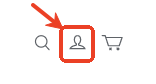
③ click the "Sign up" button at the bottom right of the screen to enter the registration page.
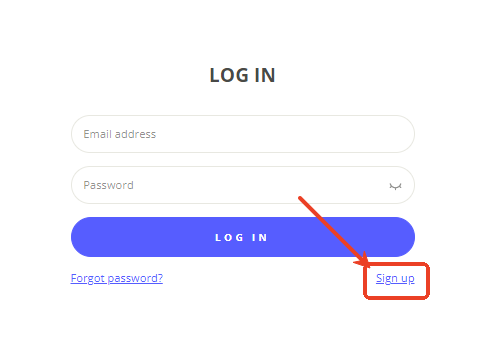
2. Enter the registration information
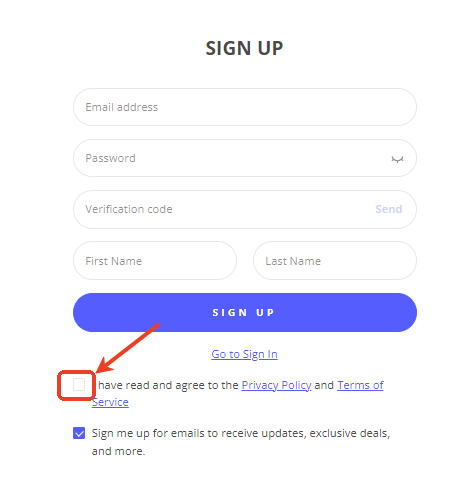
Enter the following information on the registration page.
・Email address: please enter a valid email address. You will receive confirmation emails and important notices.
・Password: set a secure password between 8 and 16 characters (we recommend including upper and lower case letters, Numbers, and symbols).
・Email verification code: if you do not receive the verification code in the email, please check your spam/spam folder. You can also try resending it.
・Username: enter your nickname or login name (we recommend an easy and memorable one).
3. Accept the terms of use
・Check the "I have read and agree to the Privacy Policy and Terms of Service" checkbox at the bottom of the page.
4. Registration complete.
・After confirming the contents, click "Sing up".
・It will be transferred to the personal purge.
・After registration, you will receive a welcome email.
Notes
・Please make sure that the information you input is correct.
・If you do not receive the email verification code, please check your spam folder or try to resend it.
・If you have any issues, please contact customer support at miya.wang@nakami.com.
What you can do after registration
・You can use the various functions and services of the site.
・You can enrich your profile information.
・Enjoy our products and services!